Computer Architecture - Nand2Tetris Unit 05
This week I hit a milestone. Done with the hardware. This was crazy! What a journey. Nand2Computer. Wow.
It was tough. The CPU was by far the hardest part of this course as of yet. Mostly because of it’s size and many moving parts.
I got through it and this is how it happened.
What I Built This Unit
- Memory - Used the RAM16K with the Screen and Keyboard.
- CPU - Central Processing Unit using the PC(Program Counter), Registers and the ALU
- Computer - Putting it all together. Memory + CPU + ROM32K(For loading programs)
What Did I Learn
A lot!
This is the part where everything came together. It was pretty cool to see, how all the small chips and parts that we build throughout the course plays a role at some point in the development.
The binary notation for instructions and how that is used. Destructuring based on the different values in the binary.
CHIP Computer {
    IN reset;

    PARTS:

    ROM32K(
        address=pcOut,
        out=romInstructionOut
     );

    CPU(
        inM=memoryOut,
        instruction=romInstructionOut,
        reset=reset,
        outM=cpuOutMOut,
        writeM= cpuWriteMOut,
        addressM= cpuAddressMOut,
        pc=pcOut
    );

    Memory(
        in= cpuOutMOut,
        load= cpuWriteMOut,
        address= cpuAddressMOut,
        out=memoryOut
    );
The Computer implementation was the simplest of the 3.
CPU. What a beast.
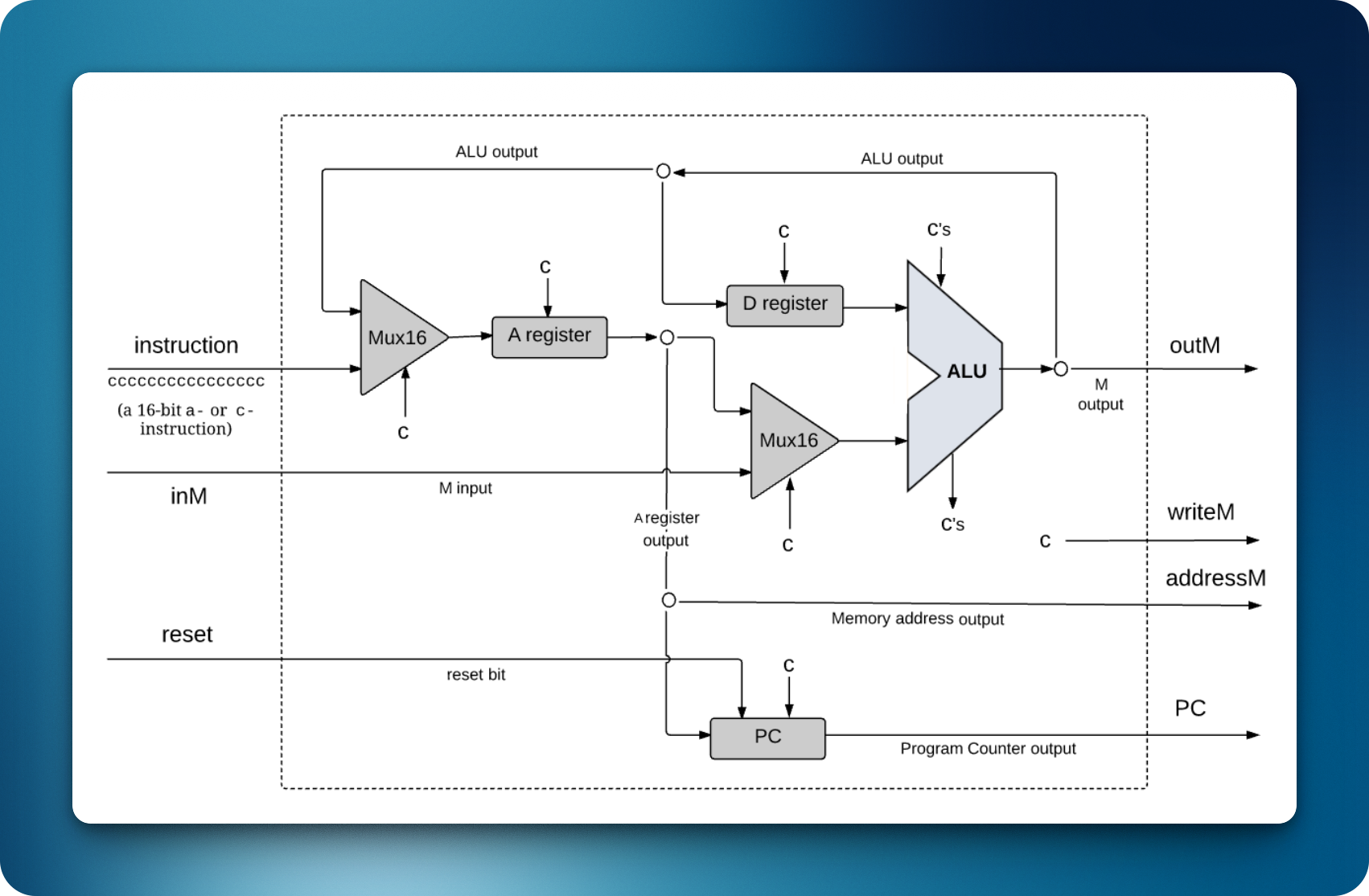
I was overwhelmed when looking at this first, but suddenly figured that if I just take one step at a time, it should be rather simple. Splitting it up into sections.
- Registers
- ALU
- Program Counter
The instructors were so nice to not include what instruction bits are used where. This was the challenge of the CPU implementation.
I learned from previous chapters that the A & C instruction is based on the leftmost bit. Therefore I had to do some deconstructuring.
    // Decode Instruction
    Not(in=instruction[15], out=isAInstruction); // Flip it and if 1 it's an A Instruction
    And(a=instruction[15], b=true, out=isCInstruction); // Check it with an And static true to check if both 1 then it's C instruction.
    // Don't need decoding for the rest when A instruction.
    // Just use instruction because instruction[15] will always be 0
    // Decode C & Create Wires
    // 1xA
    And(a=instruction[12], b=true , out=a1);
    // 6xC
    And(a=instruction[11], b=true , out=c1);
    And(a=instruction[10], b=true , out=c2);
    And(a=instruction[9], b=true , out=c3);
    And(a=instruction[8], b=true , out=c4);
    And(a=instruction[7], b=true , out=c5);
    And(a=instruction[6], b=true , out=c6);
    // 3xD
    And(a=instruction[5], b=true , out=d1);
    And(a=instruction[4], b=true , out=d2);
    And(a=instruction[3], b=true , out=d3);
    // 3xJ
    And(a=instruction[2], b=true , out=j1);
    And(a=instruction[1], b=true , out=j2);
    And(a=instruction[0], b=true , out=j3);
Some of this is a little redundant. For example I could always just check on instruction[15] to see if it’s a C instruction, but I thought it was nice to get the boolean variable. Again the programmer mindset.
After deconstructing, it made way more sense and with the different diagrams of the instructions in the book, it was just a matter of looking it up. Of course it’s easier said than done when the implementation needs to be done.
Suddenly when wiring this together it hit me and it all made sense. All the Machine Assembly I wrote in the previous Unit and how the different A,D,M Registers are connected to registers I was piecing together. And suddenly how @100 worked on the machine level. This was a breakthrough and not something that is taught in many classes. They way things work together.
The Program Counter I was also struggling with a bit, but after realizing that I actually only had to check for 3 different conditions, it made sense. 3 bits. The j1, j2, j3 from above. Can combine to 8 different instructions.
Some Key Insight
Hardware is constantly running. Something is always being computed and you can’t ‘save’ a state for later. Just what is being output and the instructions is what matter. This is a shift from writing software.
Instruction encoding is pretty sick. It’s very cool how much Information you can push down into 16 1’s & 0’s. Very impressed by the logic behind this.
What Surprised Me?
That I now understood, on a basic level, how a CPU works. This I think is kind of crazy. Computing and hardware was always a magic black box, but now it somewhat makes sense to me.
Also, again I must address that how everything that I’ve done in the course up until now. How everything is connected. The nand gates and the building blocks from Unit 01. The ALU from Unit 02. Memory and PC from Unit 03. Somewhat the assembly from 04. This was more the instructions that we wrote for the CPU. An assembler for that unites the Machine Code and CPU will be made in Unit 06. Looking forward to that, and after that I will probably take a break from this course. I’ll explore the assembler in Unit 06, then take a break to focus on C programming and other systems topics before returning to finish the course.
Conclusion
If someone asks me how a Computer works, I’m pretty confident in my answer.
I will now do some Cyber Security and then return to Unit 06 in 2 weeks time!
All the best,
See you around!